
Use AI to summarize this article

- Short answer: yes, Webflow is a strong platform for AI search optimization.
- Built-in tools: a native schema markup field, schema connected to CMS fields, llms.txt support, clean code, and fast hosting.
- Limits: some CMS field types can't be used in schema, and Webflow's most advanced AEO tools are for Enterprise plans, but there are simple workarounds.
- Our process: we scan every site on isitagentready.com, then fix everything it needs, from schema markup to llms.txt.
- The bigger picture: technical optimization is only the tip of the iceberg. Getting recommended by AI also takes detailed content and mentions on other websites.
More and more B2B buyers start their research by asking ChatGPT, Perplexity, Gemini, or Claude instead of typing into Google. So a new question keeps coming up in our calls with clients: if we want AI tools to understand and recommend our company, is Webflow the right platform for our website?
Short answer: Yes. After building and optimizing Webflow sites for B2B clients, and working side by side with SEO agencies on many of them, we can say Webflow gives you almost everything you need for AI search out of the box.
It has a built-in schema markup field, llms.txt support, structured data that connects directly to your CMS, clean code, and fast hosting. In this article, we go through what AI search actually needs from a website, what Webflow offers for it, where its limits are, and how we optimize Webflow sites for AI step by step.
What AI search needs from your website
Before we look at Webflow, it helps to know what AI tools look for. To recommend your company, an AI assistant needs to do three things: reach your pages, understand them, and trust them.
- Reach: AI crawlers must be allowed to access your site, and your content should be in clean HTML, not hidden behind scripts.
- Understand: clear structure, descriptive headings, and structured data (schema markup) tell AI what each page is about: your company, your services, your products, your FAQs.
- Trust: detailed, specific content, like case studies with real numbers, plus mentions of your company on other websites, give AI the confidence to recommend you.
A platform can't do the third part for you; that comes from your content and reputation. But it can make the first two easy or hard. That's where your choice of platform matters.
What Webflow gives you for AI optimization
Webflow has invested heavily in AI search over the last two years. Here's what you get today.
A built-in schema markup field
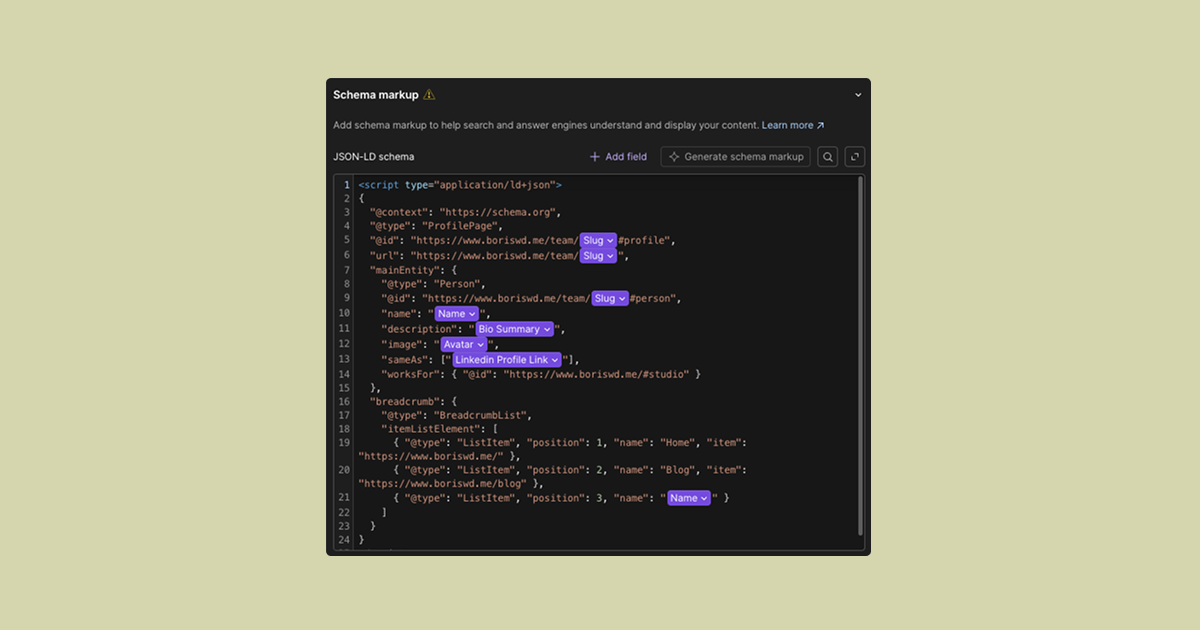
Schema markup tells search engines and AI tools exactly what a page contains, for example an organization, a service, an article, or an FAQ. Webflow now has a native schema markup field in Page settings, where you can write JSON-LD yourself or generate it with Webflow AI. No more pasting code into custom code fields and hoping nothing breaks. We cover the full setup in our guide on improving visibility on your Webflow site with schema markup.
Schema connected directly to your CMS
This is one of Webflow's biggest strengths. On CMS template pages, like blog posts, case studies, or services, you can bind dynamic Collection fields inside the schema, so every item gets its own unique structured data automatically. Add a new blog post, and its Article schema is ready the moment you publish. For teams that publish often, this saves hours and keeps every page consistent.
llms.txt support
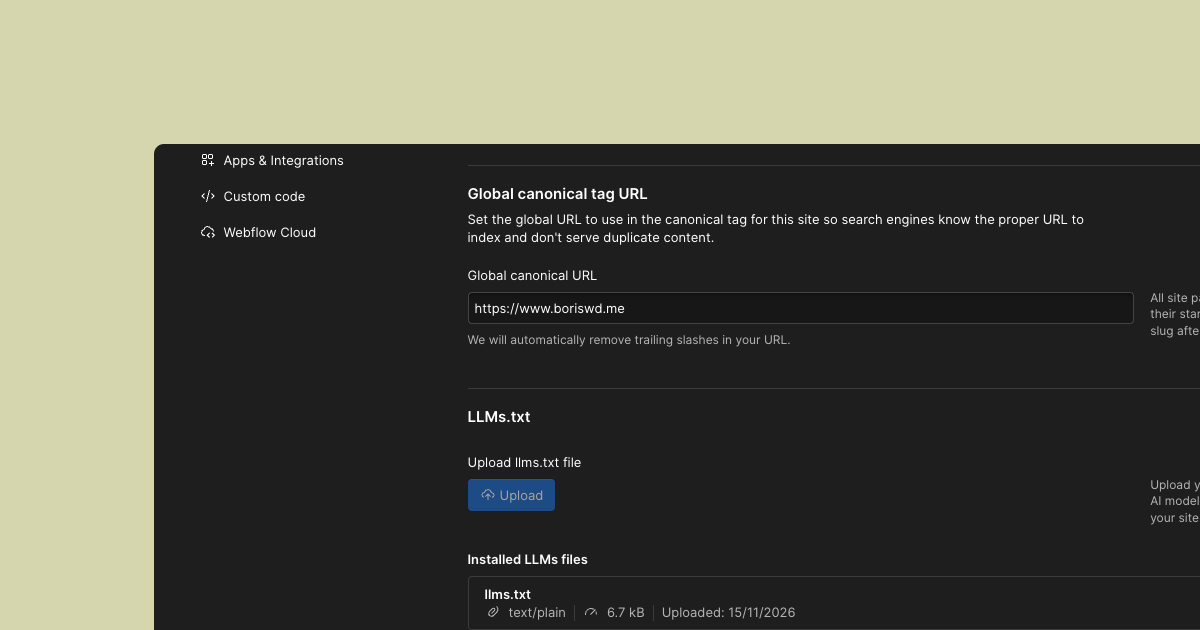
Webflow lets you upload an llms.txt file in your site's SEO settings, and it serves the file from your domain's root without letting search engines index it. As we explained in our AEO article, llms.txt alone won't get you recommended, but having it costs nothing and Webflow makes it a two-minute job. For a full walkthrough, see our step-by-step guide to llms.txt in Webflow.
Clean code and fast hosting
AI crawlers prefer pages that are fast and easy to read. According to Webflow, every site automatically generates clean, semantic code, and pages are served from a global CDN. That means your content is in the HTML itself, not hidden behind heavy scripts, which is exactly what AI crawlers need.
Full control over SEO basics
Webflow includes redirects, automated sitemaps, schema markup, and Open Graph tags as built-in features. Meta titles, descriptions, alt text, and headings can all be managed per page and per CMS item, so your SEO team can work in the same place as your marketing team.
AI tools for auditing and AEO
Webflow has added AI features that audit and improve SEO and AEO directly in the platform. For larger companies, Webflow launched Webflow AEO in April 2026, a dedicated system for tracking and improving AI visibility, with AEO analytics and AEO agents for Enterprise plans. Webflow also offers an official MCP server, so AI tools like Claude can work directly with your site's content.
Where Webflow has limits, and how we work around them
Webflow isn't perfect, and it's better to know its limits upfront. None of them are deal-breakers, but they're worth planning for.
- Some CMS fields can't be used in schema. Reference, Multi-reference, and Multi-image fields aren't supported in the schema markup field. We solve this by adding simple text fields to the Collection just for schema, or by using apps like Schema Flow that map schema to CMS fields.
- FAQ schema from CMS lists takes extra setup. When FAQs live in a CMS Collection, their schema has to be built with a small code embed on the page. It's a one-time setup per template, and after that it updates on its own.
- The most advanced AEO tools are for Enterprise. Webflow's AEO analytics and AEO agents are part of its Enterprise plans. Smaller teams can get the same insights with external AI visibility tools and regular manual checks in ChatGPT, Perplexity, and Gemini.
- The platform can't create trust for you. Like any CMS, Webflow can make your site easy for AI to read, but recommendations still depend on detailed content and mentions of your company on other sites.
In practice, these limits rarely slow a project down. Most of what AI search needs is available natively, and the rest takes a bit of setup during the build.
How we optimize Webflow sites for AI
When we optimize a Webflow site for AI search, often together with our clients' SEO agencies, we always start with a scan. We run the site through Is Your Site Agent-Ready?, a free tool from Cloudflare that checks how well a website supports the standards AI tools and agents use.
The results show us exactly what's missing, and from there we make every change the site needs, from schema markup to llms.txt and everything in between.
Our process looks like this:
- Scan the site. We run the agent-readiness check and review the results together with an SEO and content review of the key pages.
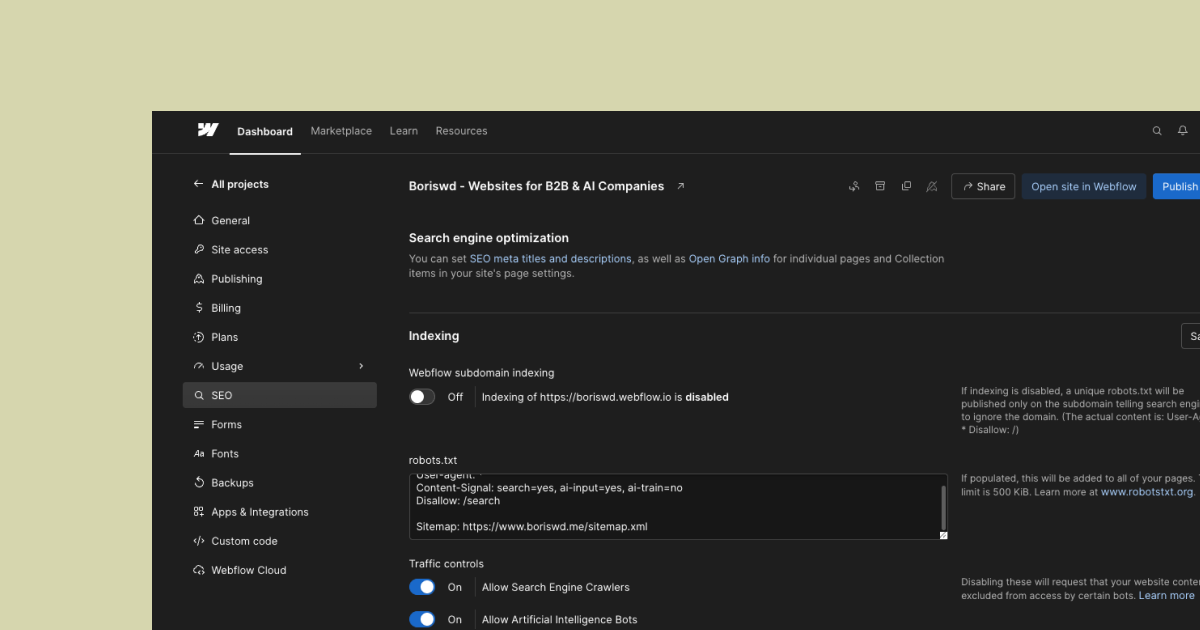
- Fix AI access. We make sure robots.txt, the sitemap, and any CDN or firewall settings let AI crawlers reach the site.
- Add schema to every key page. Organization schema site-wide, Service schema on service pages, and Article and FAQ schema on blog posts, using Webflow's native schema field and CMS bindings.
- Add llms.txt. A short, curated overview of the site, uploaded in Webflow's SEO settings.
- Structure the content and CMS. Clear headings, one topic per page, and case studies, services, FAQs, and comparisons in structured Collections, so each item gets consistent pages and schema automatically.
- Make the copy specific. We work with the client on concrete facts: who they help, how, with what results, and at what price.
- Scan again and track. We re-run the check to confirm the fixes, ask AI tools the questions buyers ask, and track traffic coming from AI tools over time.
This is the same process we use for our own clients, and it's why we confidently recommend Webflow to B2B companies that want to be visible in AI search.
Conclusion
Webflow is a strong choice if you want your website to be ready for AI search. It handles the technical side well: clean code, fast hosting, a native schema field, schema connected to your CMS, and llms.txt support. And because your marketing team can update content on its own, it's easier to keep pages detailed and current.
But technical AI optimization is only the tip of the iceberg. Schema, llms.txt, and agent-readiness are the basics, much like meta titles and descriptions are for SEO. Every website should have them, because without them you can't move forward.
They just aren't what gets you recommended. If you really want a share of AI answers in your industry, you need detailed content and a strong presence on other websites. We wrote about this in depth in our article on what really helps with AEO for B2B companies.
Want to know where your website stands today? Through our website audit, we prepare a complete AI optimization report for your site. You get a detailed PDF plus a Loom video where we walk you through what's holding your site back, where the problems are, and how we can help fix them. And if you'd rather talk it through, we can always go over the results together on a call.


Frequently Asked Questions
It covers everything that helps your website get found on Google and recommended by AI tools like ChatGPT and Perplexity. For a Webflow site, that usually includes:
- Technical SEO: Clean page structure, a correct sitemap, 301 redirects, and fixing broken links or indexing issues.
- On-page optimization: Meta titles, descriptions, headings, alt texts and Open Graph images for every page and CMS item.
- Structured data: Schema markup that helps search engines and AI understand your business, services and content.
- Speed & performance: Optimized images, scripts and Core Web Vitals for faster load times.
- AEO content: Clear, answer-focused content and FAQs that AI tools can easily understand and cite.
Because Webflow gives us full control over SEO settings, both on static pages and in the CMS, these improvements are easy to maintain as your website grows. Learn more about our SEO & AEO services.
Yes. You can upload an llms.txt file in your site's SEO settings, and Webflow serves it from the root of your domain without letting search engines index it. It takes a few minutes, but keep in mind that llms.txt on its own doesn't get you recommended by AI tools
Yes. Webflow has a native schema markup field in Page settings, where you can write JSON-LD or generate it with Webflow AI. On CMS template pages, you can connect schema to Collection fields, so every blog post, case study, or service page gets its own structured data automatically.
No. Schema markup, llms.txt, CMS bindings, and AI-friendly structure are available on regular site plans. Enterprise adds Webflow's dedicated AEO analytics and AEO agents, which are useful for large teams, but most B2B companies can get great results without them.
Yes. We regularly optimize existing Webflow sites, often together with our clients' SEO agencies. A good first step is a website audit, which shows what's missing, and then we take care of the rest through our SEO and AEO optimization service.